Getting started
First steps with Butterfly AI
Overview
Butterfly AI is a predictive AI toolkit that allows you to easily turn your tabular, labelled data into actionable predictions on new, unseen data.
For that, the following is needed:
- CSV file with tabular, labelled data
- CSV file with unseen data, same format of labelled data
From there, getting your first predictions is only few steps away:
- Access the platform
- Create a dataset by uploading your CSV file with labelled data
- Train a model from the created dataset
- Create a prediction that uses the model by uploading your unseen data CSV file
- Download your CSV unseen data file populated with results
In this page you can:
- Follow a step by step explanation with sample dataset
- Watch a video walkthrough
- Find out next steps to get the maximum from Butterfly AI platform
Both UI dashboard and API (curl commands) are provided. Consult the glossary for key metrics and terms used.
Examine sample CSV data
To fully understand how CSV should be preparated for this platform, follow the input CSV creation guide. But for convenience, a couple pre-created labelled and blind CSV files are provided.
This sample data represents a set of readings from IoT devices present in a oil plant, aimed at predicting failure in key infrastructure.
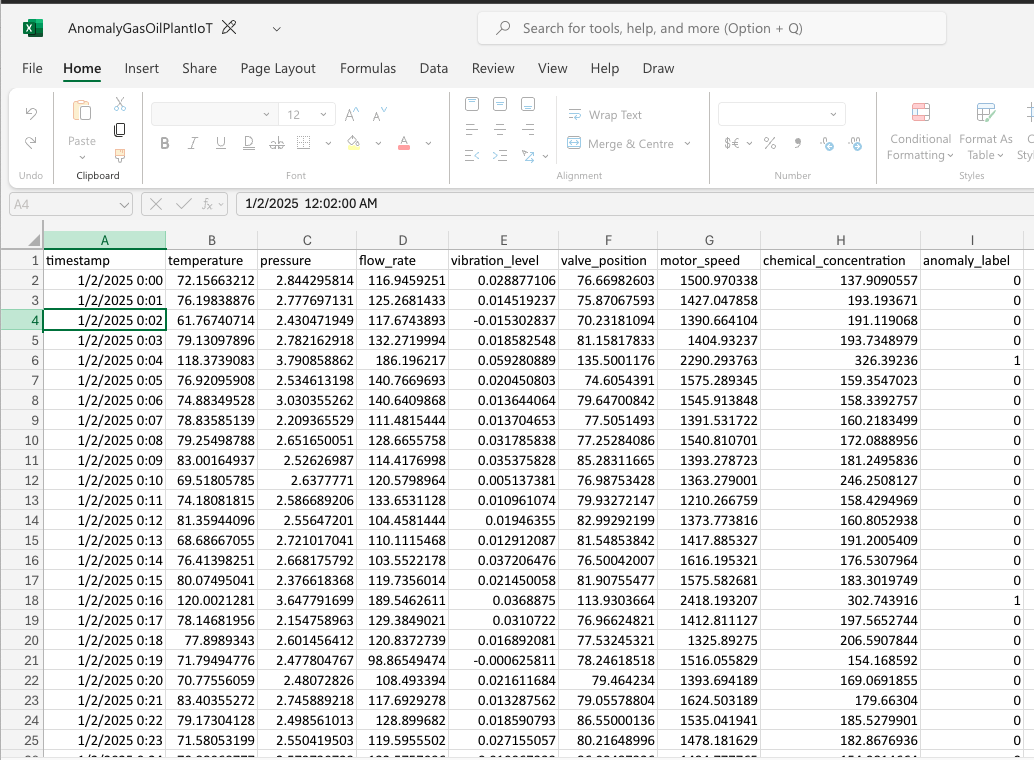
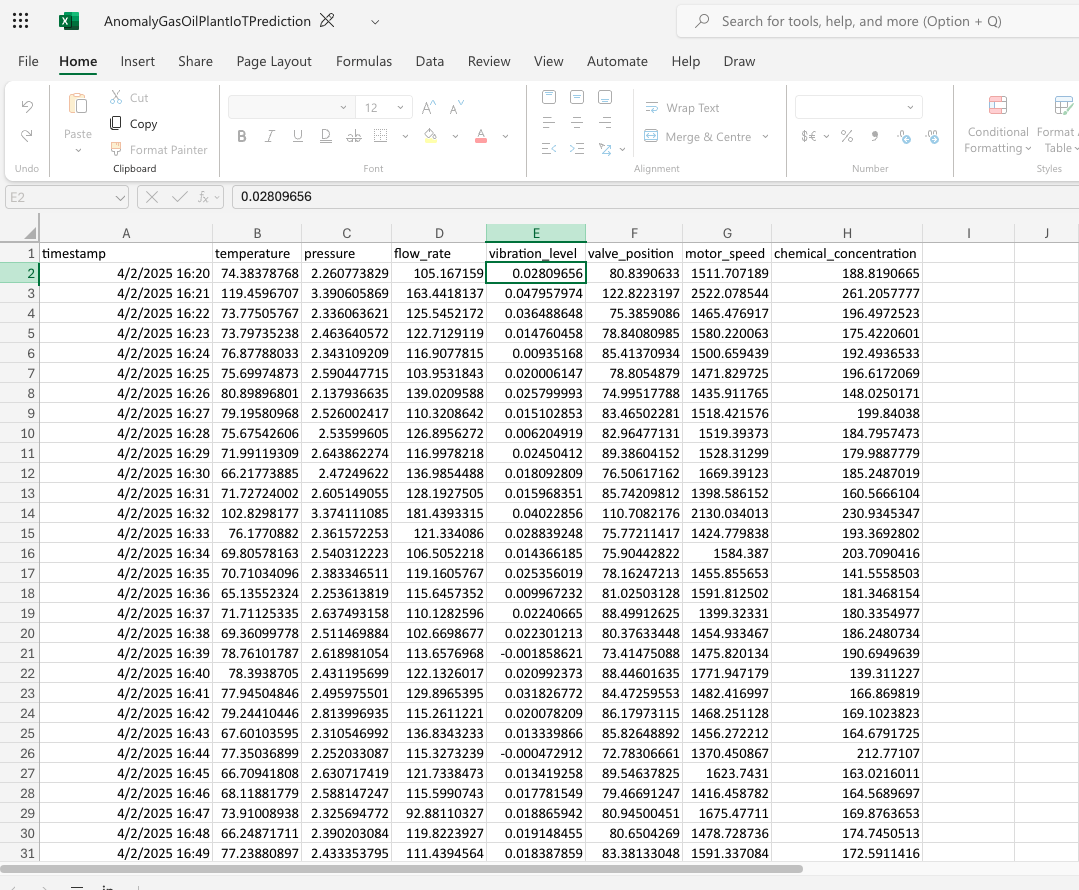
Key considerations:
- The
timestampacts as the uniqueID - The relevant features are the columns
temperature,flow_rate,vibration_level,valve_position,motor_speed,chemical_concentration - The outcome (binary classification for this example) is coded in the
anomaly_labelcolumn (0=no anomaly,1=anomaly)
More data and use cases can be explored in depth in the Use cases section.
Access the platform
First of all, request access to Butterfly AI.
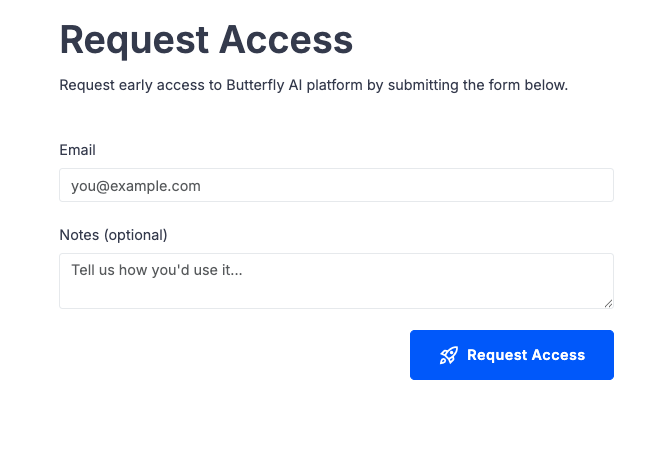
Once the form is submitted, you should shortly receive an email with your credentials. These credentials work for both the Dashboard and REST API.
The Butterfly AI Dashboard is a simple web application that allows you to upload your CSV with sample data, train a model and run predictions on new, unseen data.
Use the link and provided credentials to log into the platform
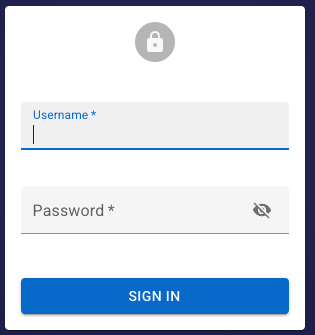
After successful login, the following page should appear:

To access via API, use the provided links and credentials to login. The following are curl commands that use the endpoints fully described in the API Reference. There’s also a Postman collection with some built-in useful automations.
To login:
  curl --location 'https://{baseUrl}/api/login' \
--header 'Content-Type: application/json' \
--data-raw '{ "username": "youremail@email.com", "password": "<yourpassword>"}'
the response should look like this:
  {
    "access_token": "<token>",
    "token_type": "Bearer",
    "expires_in": 3600,
    "username": "<your-email>"
}
The returned access_token has 1h expiration and needs to be passed into every request. More details in API Reference.
Create your first dataset
To get started, let’s create a dataset from the sample labelled CSV file
Select Datasets from the side menu, then Create button on right hand side. Then populate the form:
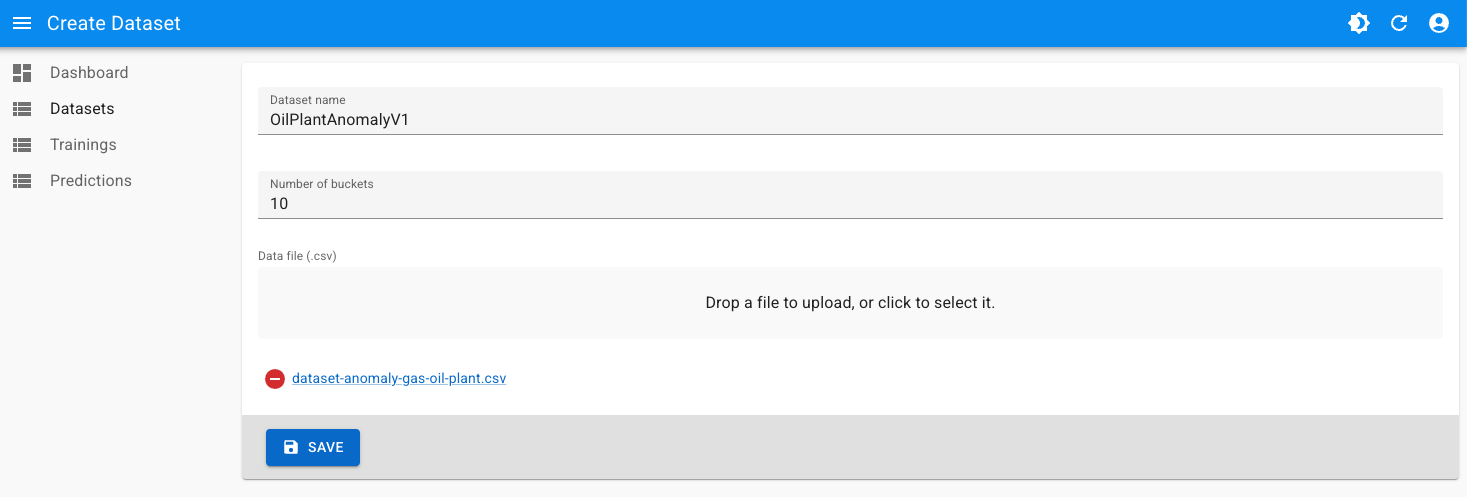
Dataset name: set a descriptive name, must be unique across the platformNumber of buckets: set it as10for this dataset. This is one of the hyperparameters that can be later modified to enhance model performance. More details on Hyperparameter tuning.
Click Save and wait for the dataset to finish processing.

Once the dataset is in COMPLETED status, it’s ready for training.
Creating a Dataset using the API is done as 2-step process:
- Create an empty
Dataset - Use the signed URL returned from the previous step to add the labelled CSV data
Create an empty dataset
To create an empty dataset using the API:
  curl --location 'https://{baseUrl}/api/v1/datasets' \
--header 'Content-Type: application/json' \
--header 'Accept: application/json' \
--header 'Authorization: Bearer {token}' \
--data '{
  "datasetName": "OilPlantAnomalyV1",
  "numberOfBuckets": 10
}'
the response should look like this:
  {
    "datasetKey": "4223df90-0c31-4abf-a0e8-339b5c79f7c7",
    "numberOfBuckets": 10,
    "status": "PENDING",
    "datasetCreationProgressUrl": "https://{baseUrl}/api/v1/datasets/4223df90-0c31-4abf-a0e8-339b5c79f7c7",
    "datasetUploadInfo": {
        "uploadUrl": "https://storage.googleapis.com/mdt/inputs/datasets/4223df90-0c31-4abf-a0e8-339b5c79f7c7/OilPlantAnomalyV1.csv?X-Goog-Algorithm=GOOG4-RSA-SHA256&X-Goog-Credential=butterfly-ai-runtime-dev%40mathficast-dev.iam.gserviceaccount.com%2F20250928%2Fauto%2Fstorage%2Fgoog4_request&X-Goog-Date=20250928T184724Z&X-Goog-Expires=3600&X-Goog-SignedHeaders=host%3Bx-goog-content-length-range&X-Goog-Signature=8f164c1f5c76039382dcabe904e77fa255c44722e470aa119b6033d2831372957992f22b2cad806803bdbfb33d140482cec9f8d1b284f2dab28b5d74eaafdfaab2f02fdaae3c4fcb65319e4c2e45d2b778fb7b350769e46fbd7e81bf0d19f0b090f284bb92443bf40a5f0fd033fec323bb2679f5489cf3db8ea976d98c72a7b4a7e54412642370fb6048ec42644712b5225b148bc7e9666feabf1cf08a30040f9a9523fcee9db1185ad91799586f841923d20c2af58122e4eaab43291912acbb03e1fea82c559bd90a65091aee15a79c0b7a85ff511ca1d4aa432642eed039becc9fe5b532f1780a99f93018c963d653573c9bf71b3674038e35e182e6b4d13f",
        "extraHeaders": "X-Goog-Content-Length-Range:10,534773760"
    }
}
The important parts of the response for the next step are:
datasetUploadInfo,uploadUrlandextraHeadersto craft the HTTP upload request- This
uploadUrlis valid for 1h before it expires
- This
datasetCreationProgressUrl: to poll the dataset creation for progress
Add labelled CSV data
In order to upload the CSV data against the newly created dataset, a curl command like this can be used:
  curl -i -XPUT '{uploadUrl}' \ <-- the signed url returned in previous step
--header 'X-Goog-Content-Length-Range: 10,534773760' \ <-- the `extraHeaders` content, only 1 header in current release
--header 'Content-Type: text/csv' \
--header 'Authorization: Bearer {token}' \ <-- the token obtained after successful login
--data-binary '@/path/to/dataset-anomaly-gas-oil-plant.csv'
if all goes correctly, the result of the above command should be similar to:
  HTTP/2 200
x-guploader-uploadid: AAwnv3IJnaaMu_pbbdyHnCq7J2c5Spq6w_QUNa9z3XRB8YCCCdggfgfgfhHV6sGTciZbIdCPj
etag: "a98e5b1e84b488e30972ab0a2aa36ce1"
x-goog-generation: 175908594073345452
x-goog-metageneration: 1
x-goog-hash: crc32c=Df4I4w==
x-goog-hash: md5=qY5b4545S0iOMJcqsKKqNs4Q==
x-goog-stored-content-length: 534175
x-goog-stored-content-encoding: identity
vary: Origin
content-length: 0
server: UploadServer
content-type: text/html; charset=UTF-8
alt-svc: h3=":443"; ma=2592000,h3-29=":443"; ma=2592000
Finally, check processing progress for the newly created dataset by polling the datasetCreationgProgressUrl:
  curl --location 'https://{baseUrl}/api/v1/datasets/api/v1/datasets/8223df90-0c31-4abf-a0e8-339b5c79f7c7' \
--header 'Accept: application/json' \
--header 'Authorization: Bearer {token}'
  {
    "datasetKey": "8223df90-0c31-4abf-a0e8-339b5c79f7c7",
    "datasetName": "OilPlantAnomalyV100012",
    "status": "COMPLETED",
    "createdOn": "2025-09-28T18:47:24Z",
    "numberOfBuckets": 10
}
For detailed information on these commands explore our API recipes or the full API documentation
Train a model
Once the dataset has finished processing (reached COMPLETED status), it’s time to train the first model from it.
Choose Trainings from the sidebar, then click Create button. Fill the form with the following:
- Scaling Factor: set it to
19. This is one of the key training hyperparameters. Full details are present in the Training guide and Hyperparameter tuning guide. - Performance threshold: set it to
0.99. This is another training hyperparameter, representing the desired prediction accuracy (99%) - Dataset: Select the newly created dataset
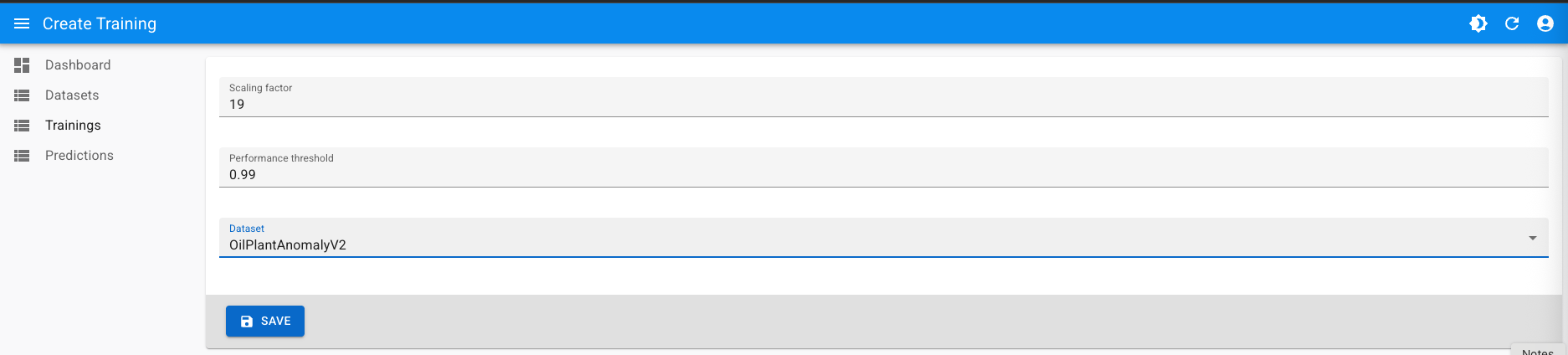
The training process starts, showing the real time performance of the 4 proprietary training algorithms of Butterfly AI:

It should take no more than 10 minutes for this dataset training to complete and get the initial Champion model:

Training via the API can be started with the following command:
  curl --location 'https://{baseUrl}/api/v1/training/datasets/8223df90-0c31-4abf-a0e8-339b5c79f7c7' \
--header 'Content-Type: application/json' \
--header 'Accept: application/json' \
--header 'Authorization: Bearer {token}' \
--data '{
  "performanceThreshold": 0.99,
  "scalingFactor": 19
}'
  {
    "trainingJobKey": "3f856c87-ceb2-4988-ad2b-60719741c38b",
    "datasetKey": "8223df90-0c31-4abf-a0e8-339b5c79f7c7",
    "status": "PENDING",
    "trainingJobProgressUrl": "https://{baseUrl}/api/v1/training/3f856c87-ceb2-4988-ad2b-60719741c38b"
}
A training job with key 3f856c87-ceb2-4988-ad2b-60719741c38b has been created. This job progress can be polled using the trainingJobProgressUrl directly to obtain basic progress and status data:
  curl --location 'https://{baseUrl}/api/v1/training/3f856c87-ceb2-4988-ad2b-60719741c38b' \
--header 'Accept: application/json' \
--header 'Authorization: {token}'

{
    "trainingJobKey": "3f856c87-ceb2-4988-ad2b-60719741c38b",
    "datasetKey": "4223df90-0c31-4abf-a0e8-339b5c79f7c7",
    "status": "COMPLETED",
    "scalingFactor": 19,
    "targetPerformance": 0.99,
    "achievedPerformance": 0.98727316,
    "trainingPerformance": 0.9937771,
    "testPerformance": 0.9807692,
    "modelKey": "4eea9572-66aa-446e-8b67-328409a56f8f"
}
Or append /progress to obtain full progress monitoring per algorithm:
curl --location 'https://{baseUrl}/api/v1/training/3f856c87-ceb2-4988-ad2b-60719741c38b/progress' \
--header 'Accept: application/json' \
--header 'Authorization: Bearer {token}'

{
    "status": "RUNNING",
    "jobs": [
        {
            "trainingJobKey": "07e98a02-d052-4f99-a021-5f6d7e9c3977",
            "algorithm": "BSEV02",
            "status": "COMPLETED",
            "latestPerformance": 0.9922231,
            "recentPerformances": [
                0.9682258,
                0.9402289,
                0.98822355,
                0.98622376,
                0.9922231
            ]
        },
        {
            "trainingJobKey": "3928598b-abf3-427c-9453-802518a78637",
            "algorithm": "BSEV01",
            "status": "COMPLETED",
            "latestPerformance": 0.9900011,
            "recentPerformances": [
                0.98600155,
                0.98800135,
                0.98800135,
                0.98800135,
                0.9900011
            ]
        },
        {
            "trainingJobKey": "8464ce1c-cd47-47d0-ba70-b2f6ae71baf1",
            "algorithm": "BFIF01",
            "status": "RUNNING",
            "latestPerformance": 0.90577775,
            "recentPerformances": [
                0.89955556,
                0.9035556,
                0.90555555,
                0.90566665,
                0.90577775
            ]
        },
        {
            "trainingJobKey": "b3ea8b00-b9d6-4855-b365-e62e29e12d7f",
            "algorithm": "BSIX01",
            "status": "COMPLETED",
            "latestPerformance": 0.9937771,
            "recentPerformances": [
                0.97977555,
                0.97777534,
                0.97977555,
                0.97977555,
                0.9937771
            ]
        }
    ]
Eventually, the COMPLETED status should be reached, showing final performances and the created model modelKey:
  curl --location 'https://url.mathficast.com/api/v1/training/3f856c87-ceb2-4988-ad2b-60719741c38b' \
--header 'Accept: application/json' \
--header 'Authorization: Bearer {token}'
  {
    "trainingJobKey": "3f856c87-ceb2-4988-ad2b-60719741c38b",
    "datasetKey": "4223df90-0c31-4abf-a0e8-339b5c79f7c7",
    "status": "COMPLETED",
    "scalingFactor": 19,
    "targetPerformance": 0.99,
    "achievedPerformance": 0.98727316,
    "trainingPerformance": 0.9937771,
    "testPerformance": 0.9807692,
    "modelKey": "4eea9572-66aa-446e-8b67-328409a56f8f"
}
At this point, a model exists with the following training metrics:
- Overall achieved performance:
0.997219 - Training performance:
0.9934427 - Test performance:
1.0000
Each new training will override this model as long as achievedPerformance is greater than the existing one. This model can now be used to create any number of Predictions on unseen data.
Check the Training guide for more details on the process.
Obtain a prediction
Once a model with the desired performance has been successfully created from training, it can be used to run predictions on unseen and unlabelled data (inference) as many times as needed. For the sake of this guide this blind CSV data is being used to try out prediction creation. This is going to be a batch prediction, in which each row represents a single, individual inference.
Select Predictions on the sidebar, then Create:
- Select the original dataset
- Upload the blind CSV
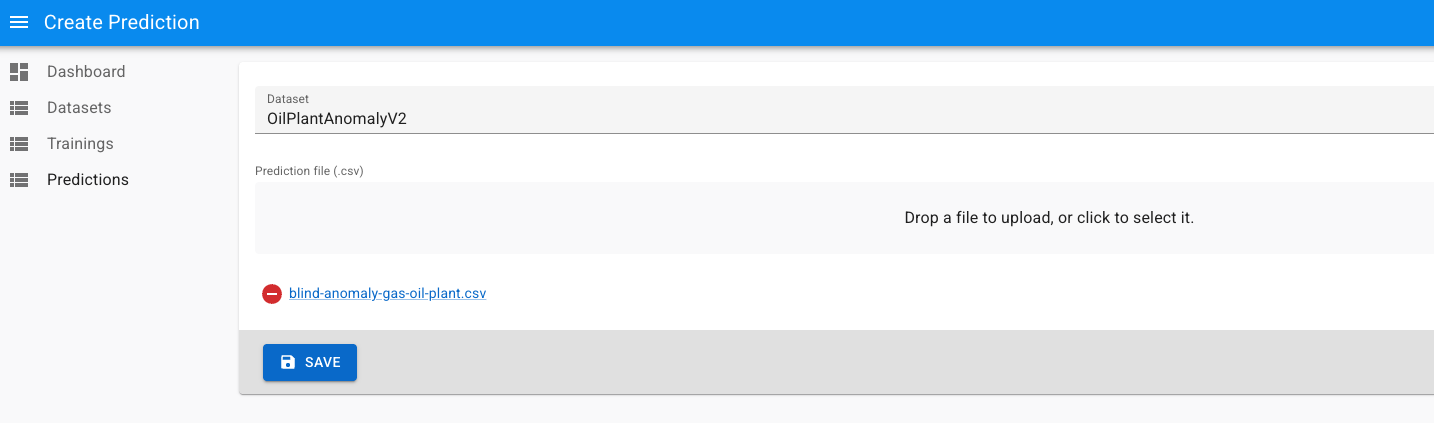
After few moments (depending on size), the prediction completes and the resulting CSV can be downloaded using the Download link:

To create a prediction using the API you’ll need to provide the modelKey to use, the command looks like:
  curl --location 'https://{baseUrl}/api/v1/predictions/models/4eea9572-66aa-446e-8b67-328409a56f8f' \
--header 'Content-Type: text/csv' \
--header 'Accept: application/json' \
--header 'Authorization: Bearer {token} \
--form '_file=@"/path/to/blind-anomaly-gas-oil-plant.csv"'
  {
    "predictionKey": "02588573-1d4f-4fcc-8985-f8aaabf09171",
    "status": "PENDING",
    "predictionCreationProgressUrl": "https://{baseUrl}/api/v1/predictions/02588573-1d4f-4fcc-8985-f8aaabf09171"
}
Check progress using predictionCreationProgressUrl:
  curl --location 'https://{baseUrl}/api/v1/predictions/02588573-1d4f-4fcc-8985-f8aaabf09171/progress' \
--header 'Accept: application/json' \
--header 'Authorization: {token}'
  {
    "status": "COMPLETED"
}
Download the result using the predictionKey and redirecting the output to a CSV file:
  curl --location 'https://{baseUrl}/api/v1/predictions/02588573-1d4f-4fcc-8985-f8aaabf09171/download' \
--header 'Content-Type: text/csv' \
--header 'Authorization: {token}' > predictionResult.csv
This is how the prediction results look like:
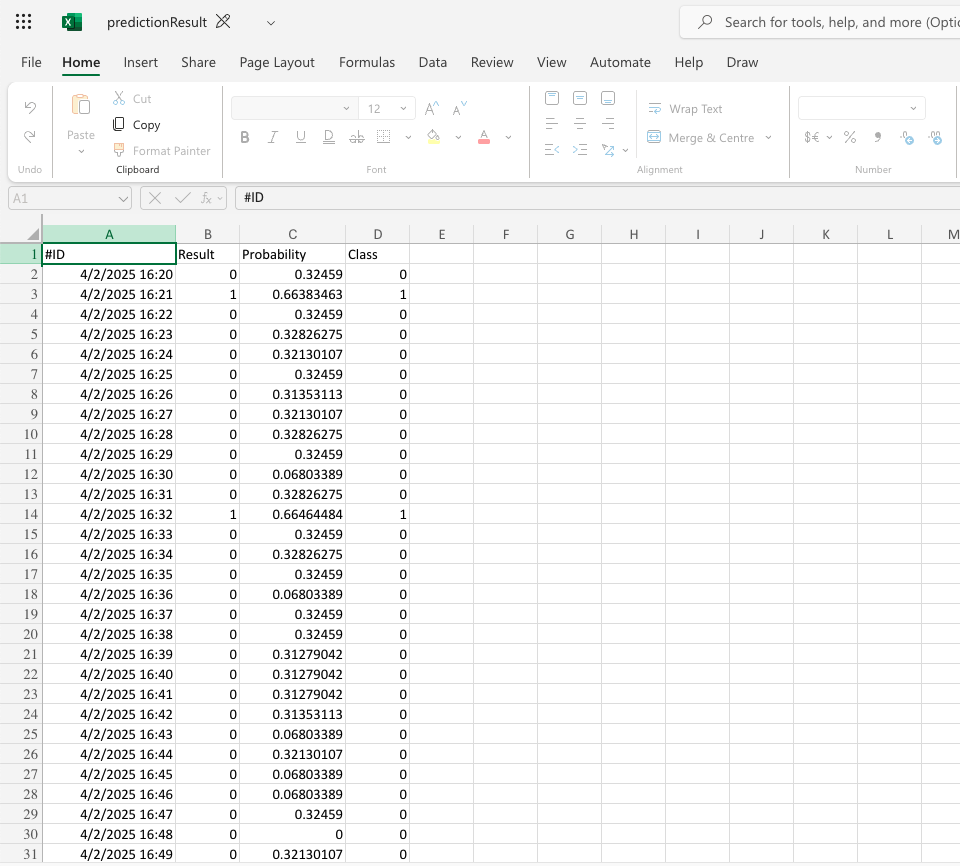
The IDs on the original blind file have been populated with a predicted label. Overall, this predicted label would be correct in 99% of the cases.
Video walkthrough for Parkinson diagnosis data
This is a video walkthrough outlining the step by step process to analyse Parkinson diagnosis data within Butterfly AI platform.
Where to go from here
This guide has explored the key workflows within Butterfly AI platform and to get a first prediction. In a nutshell, that’s what the platform is about: CSV with data –> training –> prediction on unseen data.
For binary predictions, the Butterfly AI Platform assigns a probability that reflects the model’s confidence. A label is chosen if its probability is above (1) or below (0) 0.5. Values closer to 0 or 1 indicate higher certainty. The probability appears as a column in the prediction results file.
Next steps:
- Get in depth understanding of the dataset creation and training processes via the Training guide
- Improve gradually the performance of the trained model via Hyperparameter tuning
- Explore real life use cases in the Use cases section
- Integrate Butterfly AI in your existing workflow using the API